
AI Trading Journal vs Spreadsheet: Which Is Better?
- HybridTrader Editorial

Choosing between an AI-powered trading journal and a spreadsheet comes down to time investment and maintenance burden. A spreadsheet requires manual entry of every trade, hands-on tagging decisions, and custom formula work to generate weekly summaries, a process that scales poorly for active traders or multi-instrument sessions. An AI journal automates trade import from broker platforms, applies assisted or algorithmic tagging, and generates summaries on demand, but introduces a dependency on third-party infrastructure and preset analysis structures. The choice depends on your trading volume, setup tolerance, and whether you prioritize complete control over reduced ongoing effort.
This comparison focuses on the practical labour cost of each approach: what you spend setting up the system, how long weekly maintenance takes, and how each handles trades across multiple instruments or strategies in a single session.
Quick answer: labour and setup trade-offs
A spreadsheet typically demands 2-4 hours of initial configuration (building columns, formulas, and validation rules) plus 15-45 minutes per week of manual data entry and analysis, depending on trade frequency. An AI journal usually requires 30-60 minutes of initial setup (connecting broker accounts and confirming import settings) and under 10 minutes per week to review auto-generated summaries and tagging, though the platform's predefined metrics may not match your specific analytical needs.
Neither approach guarantees faster improvement or better trading outcomes. The practical difference is in how much of your non-trading time you spend on maintenance versus analysis review.
Who each approach may suit
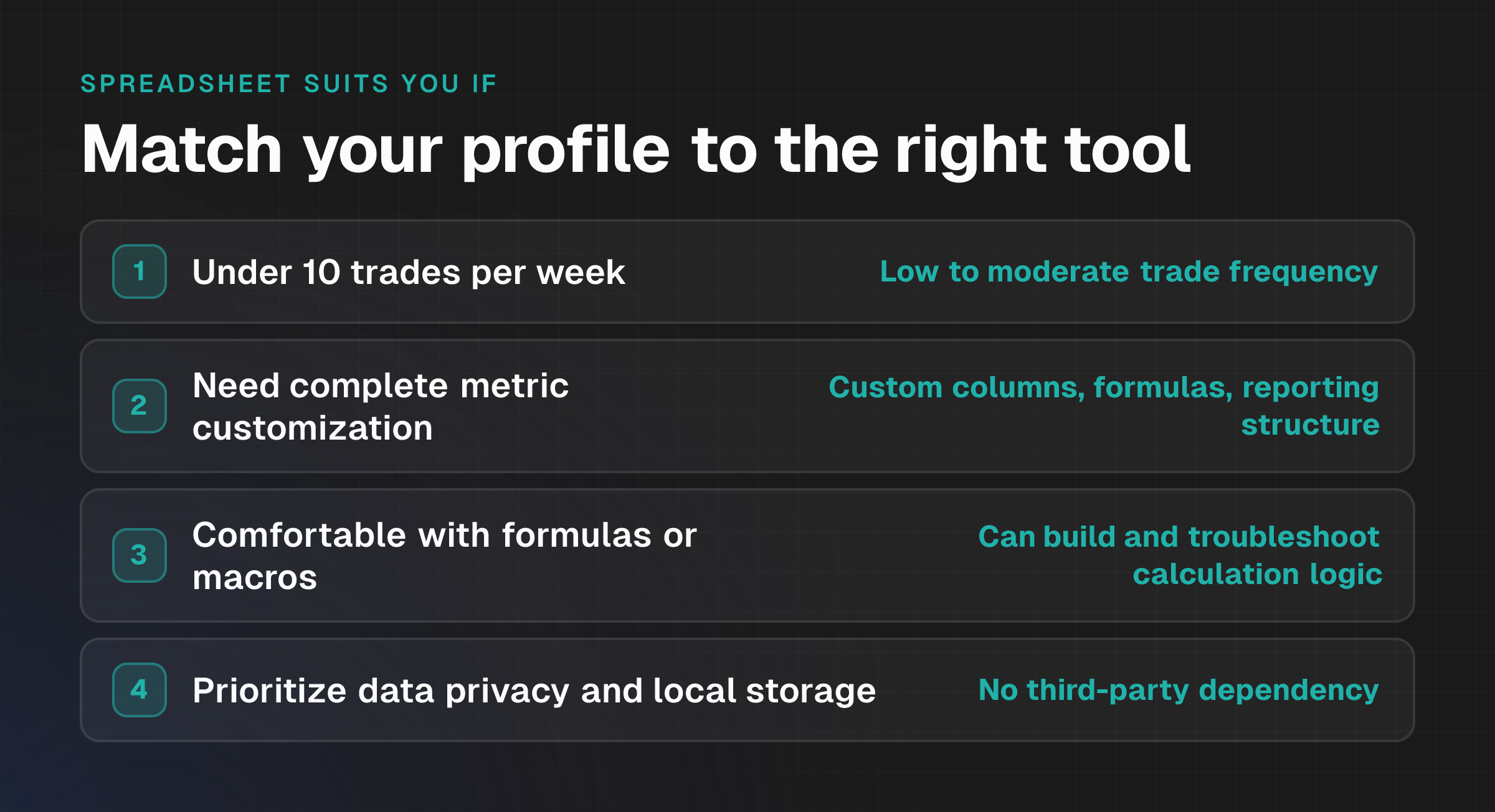
Spreadsheet:
- Traders with low to moderate trade frequency (under 10 trades per week)
- Those who require complete customization of metrics, columns, or reporting structure
- Traders comfortable building and troubleshooting formulas or macros
- Anyone prioritizing data privacy and local storage over convenience
- Traders who want full control over calculation logic and no third-party dependency
AI Journal:
- Active traders executing 15+ trades per week across one or more instruments
- Traders using brokers supported by the platform's integration network
- Those seeking to offload tagging consistency and pattern detection to automation
- Traders who want structured, standardized analysis without building custom reports
- Users comfortable storing trade data on a cloud platform in exchange for reduced manual effort
What each approach records
Both approaches capture the same foundational trade data: entry and exit prices, position size, instrument, timestamp, strategy label, and outcome (profit or loss). The distinction lies in what happens afterward.
Spreadsheet:
- Stores all data locally in a single file or workbook
- Tagging and categorization depend entirely on manual input and consistency
- Analysis is computed through formulas you define; metrics are calculated on demand
- Data structure and layout are fully under your control
- Historical audit trail exists only if you preserve file versions
AI Journal:
- Stores data on the platform's servers; you access it via dashboard or export
- Tagging can be manual, AI-suggested, or rule-based (varies by platform)
- Analysis is pre-computed and generated automatically; custom metrics may require additional configuration
- Data structure is set by the platform; customization is typically limited to field selection
- Platform maintains versioning and audit trails
Comparison table
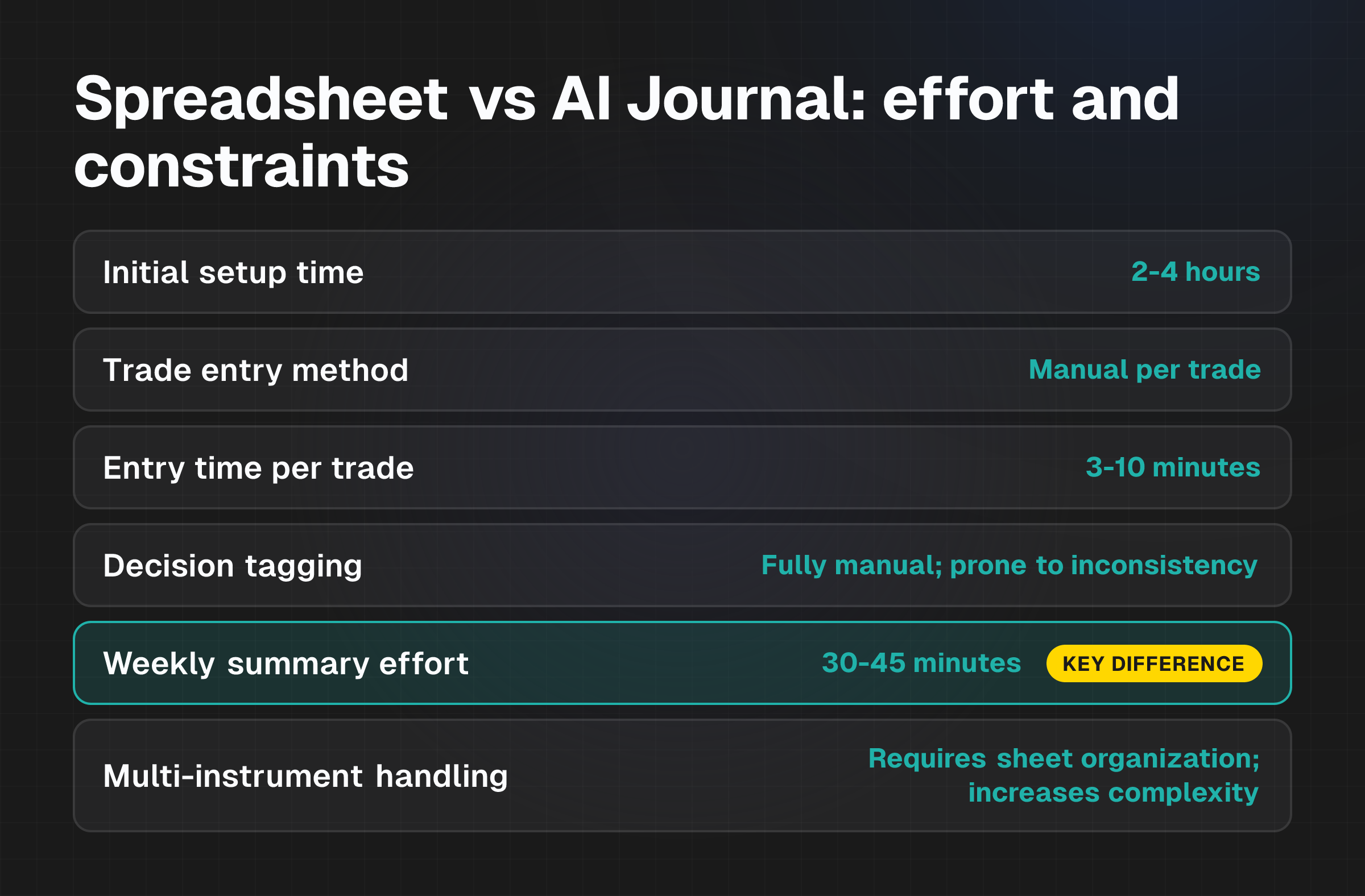
| Criterion | Spreadsheet | AI Journal |
|---|---|---|
| Initial setup time | 2-4 hours | 30-60 minutes |
| Trade entry method | Manual per trade | Auto-sync from broker or CSV import |
| Entry time per trade | 3-10 minutes (depending on detail) | <1 minute (auto-populated); 1-2 minutes if manual review required |
| Decision tagging | Fully manual; prone to inconsistency | Assisted or automated suggestions based on trade parameters |
| Weekly summary effort | 30-45 minutes (data manipulation, charting, metric calculation) | Under 10 minutes (platform generates on demand) |
| Multi-instrument handling | Requires careful sheet organization or filtering; increases complexity | Native cross-instrument dashboard; designed for multi-asset analysis |
| Customization | High; build any metric or layout | Limited to platform-defined fields and pre-built reports |
| Data privacy | Full local control | Third-party storage; review platform privacy policy |
| Recurring cost | None (spreadsheet software subscription may apply) | Typically subscription-based |
| Learning curve | Moderate to high (depends on formula proficiency) | Low to moderate (platform UI varies) |
Spreadsheet workflow
Setup means creating columns for date, entry price, exit price, size, instrument, strategy, emotional state, and outcome. You'll add formulas to calculate profit/loss, return percentage, and win rate. Optionally build validation rules to enforce consistent data entry or create separate sheets for different instruments.
After each close, manually open the spreadsheet, input all trade details, and verify calculations. For multi-instrument sessions, decide whether to use a single sheet with filtering or maintain separate tabs per instrument.
You'll manually categorize each trade (e.g., "breakout," "reversal," "impulsive") and record the reasoning or emotional state if desired. Copy or filter the week's trades, review results by strategy or instrument, manually build a chart or summary table, and note patterns or problem areas. Use spreadsheet features (pivot tables, conditional formatting) to group trades by tag, outcome, or time of day, or review the raw rows manually.
AI Journal workflow
Create an account, connect your broker account (or upload a CSV of past trades), and confirm that the platform has correctly matched column headers to trade data fields. The system typically guides you through each step and shows a preview before confirming the import.
Trades are automatically pulled from your broker account in real time. No manual entry is required; the system syncs fills and exits directly. The platform may suggest tags based on trade parameters (entry/exit ratio, time of day, instrument) or offer a structured interface for you to apply custom tags. Some platforms use AI to read closed trades and detect patterns automatically.
Open the dashboard. The platform displays aggregate metrics, trade outcomes by strategy or instrument, macro context (if supported), and identified patterns all at once. The system highlights repeated patterns (discipline issues, cost drivers, repeat mistakes) without requiring you to manually filter or calculate.
Costs, effort and constraints
Spreadsheet:
Costs:
- No direct cost if you already have spreadsheet software (Excel, Google Sheets).
- Backup storage may incur a small cost if using cloud services.
Effort:
- Initial setup: 2-4 hours, rising to 6-8 hours if you want advanced features like macros or pivot tables.
- Weekly maintenance: 30-45 minutes per week for data entry, tagging, and analysis.
- Total annual effort (estimate): 26-39 hours, plus ad hoc troubleshooting.
Constraints:
- Manual entry is time-consuming for active traders (15+ trades per week).
- Tagging consistency depends on discipline; inconsistent tagging reduces pattern detection reliability.
- Multi-instrument analysis requires careful spreadsheet design to avoid errors.
- Spreadsheet errors (formula mistakes, missed entries) compound over time and are easy to overlook.
- No automated pattern detection; you must notice trends manually.
- Backup and version control depend on your own diligence.
AI Journal:
Costs:
- Typically subscription-based (exact pricing not specified in available data).
- No per-trade or variable fees (standard model is flat subscription).
Effort:
- Initial setup: 30-60 minutes to connect broker account and confirm import settings.
- Weekly maintenance: Under 10 minutes to review auto-generated summaries and validated tagging.
- Total annual effort (estimate): 9-26 hours, mostly front-loaded in setup.
Constraints:
- Dependent on broker integration availability; if your broker isn't supported, you must use CSV import (slightly more manual).
- Tagging and pattern detection are limited by the platform's algorithm; you can't define entirely custom tagging logic without platform support.
- Data stored on third-party servers; review the platform's privacy and data retention policy before use.
- Customization of reports and metrics may be limited compared to a bespoke spreadsheet.
- Subscription cost is recurring; value depends on consistent usage.
- Learning curve to use all platform features effectively may require initial time investment.
What is difficult or uncertain
Specific peer-reviewed comparisons between the exact time spent on trade entry, tagging, and summary generation for different trading volumes aren't available in published research. Actual time savings depend heavily on your trading frequency, broker integration support, and personal spreadsheet skills.
The accuracy and consistency of AI-driven tag suggestions or pattern detection aren't independently verified in available data. Whether AI tagging reduces errors relative to manual tagging, or simply shifts the error type, remains uncertain without long-term user testing.
The degree to which an AI journal platform allows custom metrics, dashboard layouts, or analytical approaches beyond its pre-built features isn't detailed in standard product documentation. This may affect traders with highly specific analysis requirements. The time required to learn all features of an AI journal, especially advanced analysis and automated coaching functions, isn't specified and may vary significantly between platforms and individual users.
While spreadsheets have no direct cost, the implicit cost of your time is real. Whether the subscription cost of an AI journal is justified by the hours saved depends on your hourly opportunity cost and consistency of use. Rough breakeven can be estimated, but it isn't standardized.
Evidence and disclosures
This comparison draws on verified public features and operational descriptions from Hybridtrader, a representative AI journal platform that supports 50 broker integrations and emphasizes automated trade import, assisted tagging, and dashboard-based analysis.
Verified facts about AI journals:
- Platforms typically support multiple broker integrations (e.g., Hybridtrader: 50 platforms supported).
- Trade import can be automated ("live sync connection") or manual (CSV upload).
- Tagging can be user-driven, AI-suggested, or rule-based.
- Weekly summaries and dashboards are auto-generated and don't require manual formula work.
- Multi-instrument sessions are displayed on unified dashboards.
Editorial interpretation (not verified across all platforms):
- The claim that AI journals reduce weekly effort to "under 10 minutes" is based on dashboard-based workflows and doesn't account for time spent reviewing, validating, or acting on auto-generated insights. Your actual time may vary.
- The time estimates for spreadsheet setup (2-4 hours) and weekly maintenance (30-45 minutes) are reasonable but depend on your spreadsheet complexity and trading frequency. Simple journals may take less; highly customized ones may take more.
- Neither approach guarantees improved profitability or better trading outcomes. A trading journal's value lies in systematic review of decisions and patterns, not in the tool itself.
How to Find Trading Patterns in Your Journal covers the interpretation of patterns once recorded, regardless of tool.
Stop Bad Trading Habits: Review Decisions With Real Data explains how consistent journaling supports decision review.
How to Journal Trades Around High-Impact Economic Events discusses context-aware journaling practices that apply to both spreadsheet and platform-based approaches.
Next step
Choose based on your trade frequency, integration needs, and tolerance for setup complexity. If you execute fewer than 10 trades per week and want full control over data structure and calculation logic, a well-designed spreadsheet may be sufficient and cost-effective. If you trade actively across multiple instruments or brokers, and your broker is supported by the AI journal's integrations, the reduction in manual entry and the pre-built analysis may justify the subscription cost and setup time.
Before committing to either approach, confirm that your chosen tool (spreadsheet or platform) integrates with your broker and supports the metrics you want to track. A journal abandoned due to friction or effort is less useful than a simpler one you maintain consistently.